Exclusive Webinar: See Our Game-Changing ABB Integration in Action
Join us December 11th for an exclusive look at what happens when industry-leading 3D vision meets seamless robotic control.


Since its launch, the MotionCam-3D Color with its innovative blue laser has generated significant interest. To provide deeper insight, we're revisiting the detailed Q&A sessions from our launch event.
During our live launch event, our experts tackled everything from core technology to real-world performance and now we've compiled the entire discussion into this Q&A post for your reference.
Let's get straight to it!
Photoneo was founded about 12 years ago by a group of passionate pioneers from Comenius University in Bratislava, Slovakia. Their goal was to build a 3D sensor that could scan objects in motion without being compromised by vibrations.
This led to the development of our own proprietary CMOS sensor and the creation of our core patented technology: Parallel Structured Light.
The core idea is to swap the traditional roles of the projector and the camera. Instead of projecting multiple light patterns in a sequence (like other structured light sensors), the MotionCam-3D projects a single, uniform light pattern.
The magic happens on our custom CMOS sensor, where the pixels are designed to collect light in a structured way, effectively perceiving and recording multiple patterns simultaneously - hence the name "Parallel Structured Light." This is what allows for high-quality, blur-free 3D scanning.
The new MotionCam-3D Color (Blue) boosts this performance significantly by incorporating a revamped, high-performance blue laser projection unit. Combined with a new set of algorithms and software tools, it's capable of tackling more challenging materials and environments, making its performance unmatched by competitors.
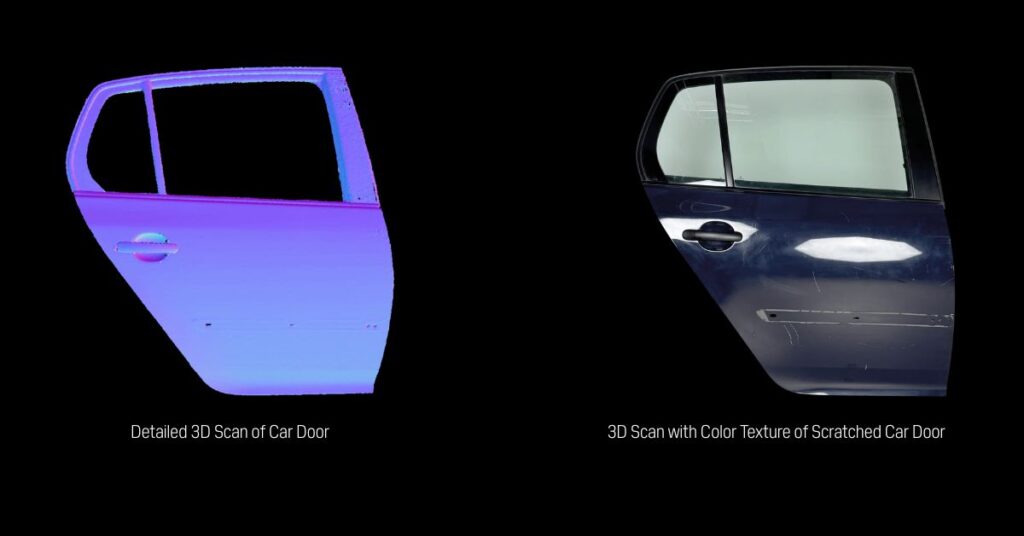
The MotionCam-3D can achieve a resolution of up to 2 megapixels, even while scanning objects in motion.
It's also important to distinguish between pixel resolution and resolving power. With the new blue laser, the projected speckle is smaller and the light is sharper and brighter. This means the camera can capture a greater amount of detail, so the effective resolving power of the system is significantly better than with previous models.
The core FPS spec remains the same. The maximum speed in dynamic mode is 20 FPS, and in static mode, it's up to 2-3 FPS, depending on the exposure time.
The key improvement from the blue laser is not a higher FPS but a much shorter required acquisition time. You can now scan the same scene in a fraction of the time. For example, the new Laser Class 3R model allows for 50% longer working distances or 2 times shorter exposure times
This is an interesting application that touches on creating a digital twin. Achieving this level of accuracy for a large object depends heavily on the entire scanning methodology, not just the sensor's accuracy.
Improving Accuracy: For the highest precision, we recommend a more controlled setup. By mounting the camera on a robot arm or a linear axis, you can use the known positions (transformations) from the robot as a pre-alignment for the scans. Our software can then use this information to perform a final, highly accurate alignment.
Yes, but only very slightly. The device is based on the same construction, but the form factor has changed by a few millimeters (11 mm larger) due to a redesigned, more efficient cooling system required for the new blue laser projection unit. This change is minor and should still be compatible with existing mounting solutions and casings, as we always recommend leaving 25mm of clearance on each side for airflow.
We are constantly improving our temperature calibration models and methodologies for all our products, and the new blue laser model benefits from these latest advancements.
Furthermore, we've made significant revisions to the mechanical build and chassis of the device, improving its overall ruggedness. This enhanced mechanical stability directly contributes to better temperature resistance and vibration resistance, making it well-suited for mounting on a robot arm.
No, eye protection is not required. While the projector emits more light, we achieved this through a complete redesign of the projection unit's optics, not by moving to a more dangerous laser class. We are able to provide significantly more light while staying within the same laser safety classes.
Our products remain available as Laser Class 2 and Laser Class 3R, providing exceptional performance without additional safety requirements.
This is a great question. The MotionCam-3D Color (Blue) actually has two separate camera units inside:
The data from these two sensors are then perfectly aligned and combined in software.
To complement the improved mechanical ruggedness, we are releasing a new suite of software-based tools to help users verify and maintain the camera's calibration in the field. This includes:
These tools ensure the device maintains its peak performance and accuracy over time, even in demanding industrial environments.
https://www.youtube.com/watch?v=o-V5pFmLE6I&feature=emb_logo
Autonomous Maintenance will be available for all new MotionCam-3D Color and PhoXi 3D Scanner Gen3 devices shipped from the end of May 2025 onwards. This includes both the new blue laser variant and the standard red laser variant.
No, the Autonomous Maintenance feature is a software-based solution for checking and correcting the camera's internal calibration. It cannot physically clean the device.
If dust accumulates on the sensor's windows, it will obstruct the view and impact performance. The device will still need to be cleaned manually as part of a regular maintenance procedure. For particularly dusty environments, we recommend using a protective housing.
It depends on the application.
Yes, the pricing is very similar. There is a slight difference, but overall, the cost is almost the same. Given the significant performance increase delivered by the blue laser technology, we believe the value proposition is now even better. For exact pricing and offers, please contact our sales representatives.
For more details, please visit the product page on our website or feel free to contact us directly.
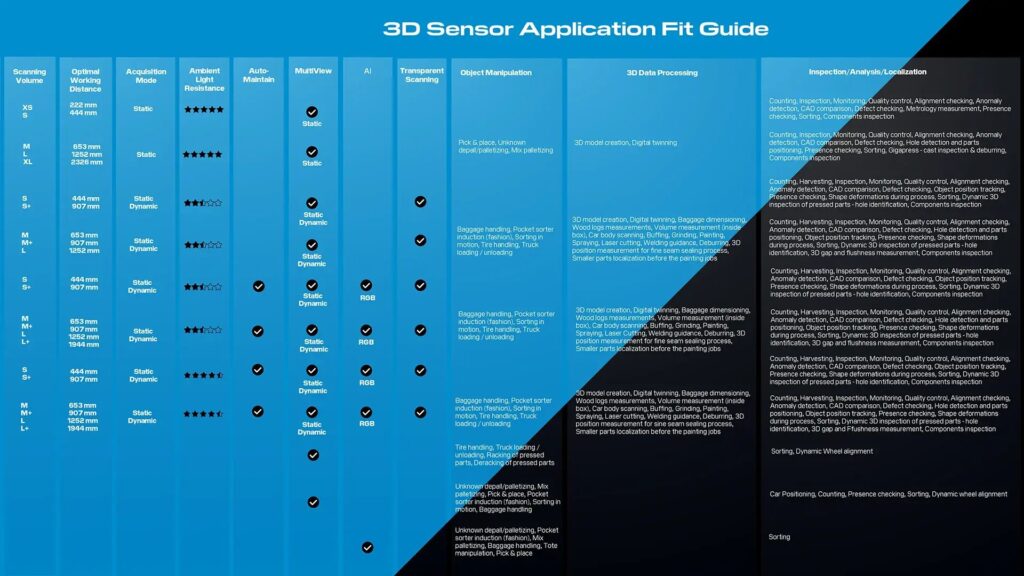
If you're still not sure which 3D sensor by Photoneo would be the best fit for you, click on the image below to download the application fit guide and find the device that would best serve your needs.
Join us December 11th for an exclusive look at what happens when industry-leading 3D vision meets seamless robotic control.